A hardware black screen of death that occurs when the system hard drive is unable to load the master boot record. The screen is blank apart from a flashing white text cursor.
The black screen of death (BSoD or BkSoD to distinguish it from the blue screen of death) is a screen displayed on many computer systems after encountering a critical system error. It gets its name from the black background seen during hardware or software errors.
In newer versions of Microsoft Windows since Windows 11 version 24H2, a black-colored blue screen of death ("BSoD") is used to indicate a system crash, but it is actually still a blue screen of death and should not be considered a black of death.
Microsoft Windows
Windows 3.x
An example of an EMM386 error message in Windows 3.0 that results in a black screen during Standard Mode
In Windows 3.x, the black screen of death is the behavior that occurred when a DOS-based application failed to execute properly. It often occurred in connection with certain operations while networking drivers were resident in memory. (Commonly, but not exclusively, it was seen while the Novell NetWare client for DOS, NETX, was loaded.)
The issue was fixed in most instances by adding an additional section in the SYSTEM.INI file of affected clients with the text TimerCriticalSection = 10000. The files vtdapi.386re.386 and vipx.38id-1991 were also updated by Ed Brown, a technician with the Coca-Cola Company's IT department in Atlanta, GA. He reports that the company was rolling out Windows 3.0 within the Global Marketing group, and the users attempted to run WordPerfect, they received a black screen.[citation needed]
MS-DOS and Windows (Windows 95 to Windows 11)
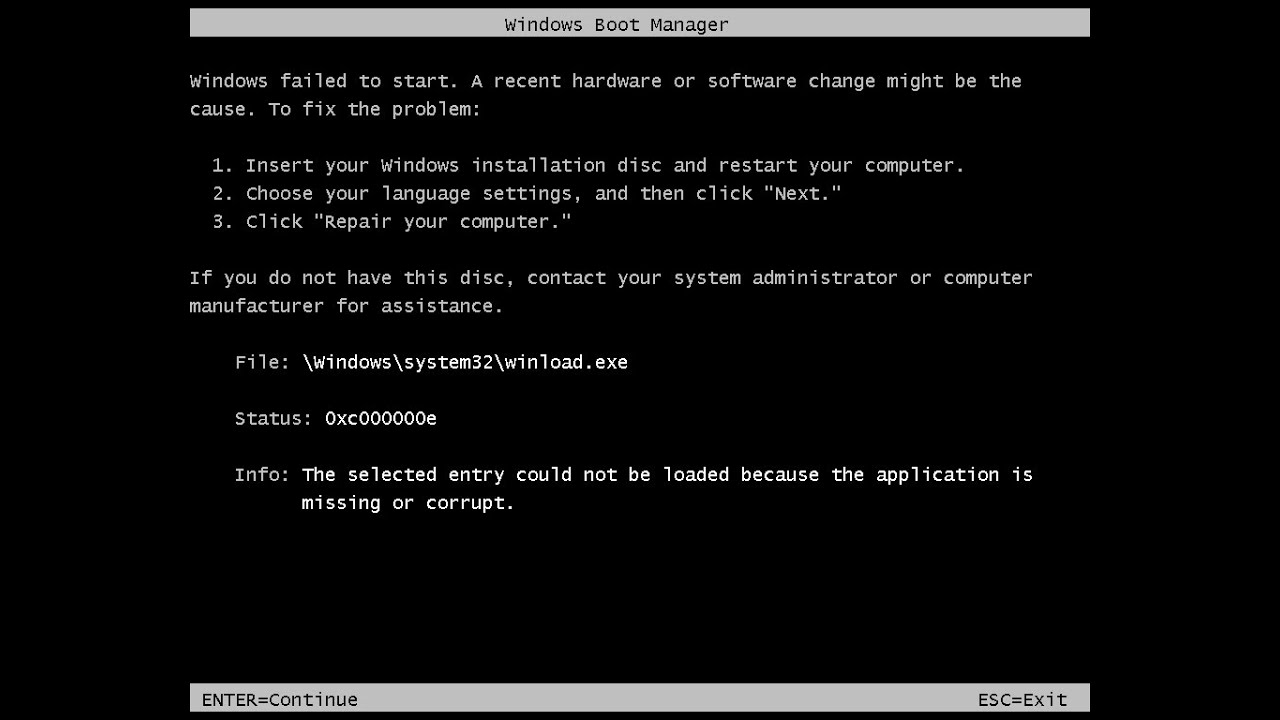
An example of an error message outputted by the boot loader on Windows XP during startup, usually caused by a missing or corrupted file crucial to system operation (in this case, being "hal.dll")
The most common issue contributing to a black screen of death on startup is usually due to a missing file.[1] It also occurs when the user enables file compression on all the files, causing the entire operating system to become compressed and unbootable. Rarely an experienced user would reinstall Windows. In the case of the former, the boot loader will most likely inform the user the name of the missing file as seen in the image on the right, allowing for the user to supply and/or reinstall the missing files to resolve the boot problem. In the case of the latter, however, the computer will not be able to boot, even into safe mode.[2][3] The only way to resolve this problem is to boot into another device and then uncompress the files from it to make the system bootable again.
In late 2009, several new reports of the black screen in Windows XP, Windows Vista, and Windows 7 emerged. At first, several claims pointed at Windows Update. This was later recanted by Prevx as an erroneous report.[4][5] Microsoft reported that no security update was causing the issue, and may be tied to malware.[6][7]
In other cases, the black screen was replaced with a blue screen of death. A black screen may also be caused by certain components of the computer overheating, in place of the traditional blue screen, that appeared to indicate a stop error. This black screen was simplified compared to the previous blue screen, omitting instructions that the user is recommended to take.[citation needed]
Windows 10 and later also displays a black screen due to an unfinished update in addition to the aforementioned causes above; in this case, after the system restarts and the user tries to login to the system, the user is then stuck at a black screen instead. Performing a hard shutdown and then a cold-boot of the system is the only way to resolve this problem.[8]
macOS
Some versions of macOS (such as OS X Lion) display a black screen of death instead of a kernel panic in the event of a hardware or software failure. This is usually pointed to a graphics card failure or a sleep/wake issue.[9] It may also display a black screen when the operating system is unable to boot properly at startup,[10] similar to that of Windows.
Video game consoles
Black screens can also occur on video game consoles, usually upon hardware or software failures. The Wii, Wii U, Nintendo Switch and Switch 2 consoles as well as the 3DS handheld will display a black screen upon hardware or software failure. For instance, the Wii will display the following message on-screen if the software encounters an error, usually on physical media by read errors or damage to the game medium:
An error has occurred. Press the Eject Button and remove the disc, then turn the Wii console off and refer to the Wii Operations Manual for help troubleshooting.
Sometimes, the user must hard shutdown the console itself as the power button may not be responsive during this state, however this is known to be the case.